> ## Documentation Index
> Fetch the complete documentation index at: https://mintlify.com/xinntao/Real-ESRGAN/llms.txt
> Use this file to discover all available pages before exploring further.
# Anime Models
> Models optimized for anime images, illustrations, and manga
Real-ESRGAN provides specialized models for anime content, trained specifically to handle the unique characteristics of anime artwork, manga, and illustrations.
## RealESRGAN\_x4plus\_anime\_6B
This model is optimized specifically for anime images with a smaller network architecture (6 RRDB blocks) for efficient processing while maintaining high quality.
### Model Specifications
| Property | Value |
| ------------------- | ------------------------------------------------------------------------------------------------------------------------------------- |
| **Scale** | 4x |
| **Architecture** | RRDBNet |
| **RRDB Blocks** | 6 (vs 23 in general model) |
| **Features** | 64 |
| **Growth Channels** | 32 |
| **Optimization** | Anime-specific training data |
| **Download** | [RealESRGAN\_x4plus\_anime\_6B.pth](https://github.com/xinntao/Real-ESRGAN/releases/download/v0.2.2.4/RealESRGAN_x4plus_anime_6B.pth) |
### Key Features
Trained specifically on anime images for better line preservation and color handling
Only 6 RRDB blocks (vs 23 in general model) for faster processing
Preserves crisp anime line art without over-smoothing
Maintains anime color characteristics and gradients
## Usage
### PyTorch Inference
```bash theme={null}
# Download the model
wget https://github.com/xinntao/Real-ESRGAN/releases/download/v0.2.2.4/RealESRGAN_x4plus_anime_6B.pth -P weights
# Run inference
python inference_realesrgan.py -n RealESRGAN_x4plus_anime_6B -i inputs
```
### NCNN (Portable Executable)
For Windows, Linux, or MacOS without Python installation:
Download the portable executable for your platform:
* [Windows](https://github.com/xinntao/Real-ESRGAN/releases/download/v0.2.5.0/realesrgan-ncnn-vulkan-20220424-windows.zip)
* [Linux](https://github.com/xinntao/Real-ESRGAN/releases/download/v0.2.5.0/realesrgan-ncnn-vulkan-20220424-ubuntu.zip)
* [MacOS](https://github.com/xinntao/Real-ESRGAN/releases/download/v0.2.5.0/realesrgan-ncnn-vulkan-20220424-macos.zip)
```bash theme={null}
# Windows
./realesrgan-ncnn-vulkan.exe -i input.jpg -o output.png -n realesrgan-x4plus-anime
# Linux/MacOS
./realesrgan-ncnn-vulkan -i input.jpg -o output.png -n realesrgan-x4plus-anime
```
## Comparisons with waifu2x
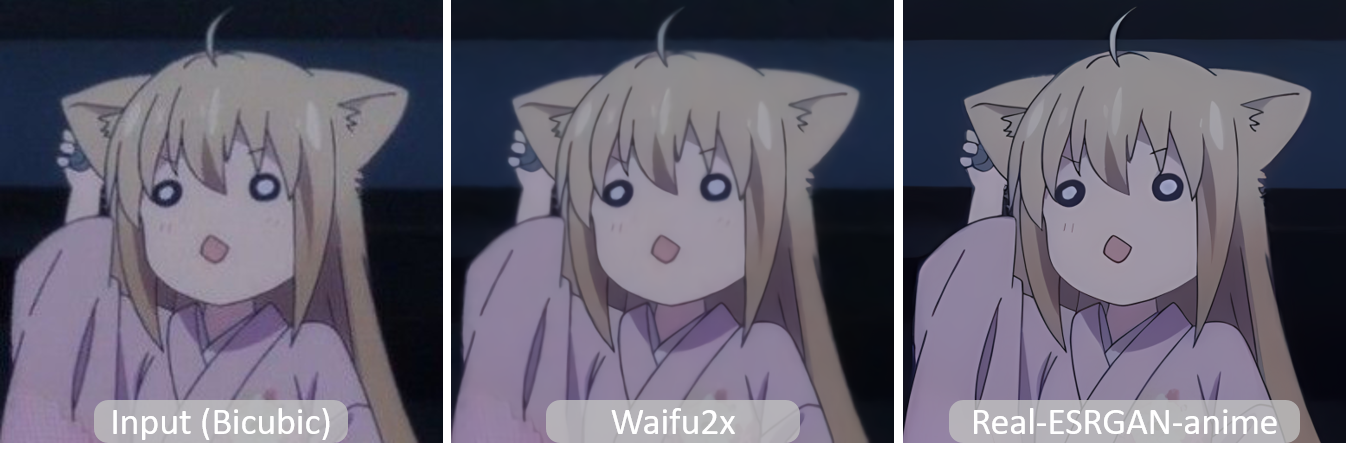
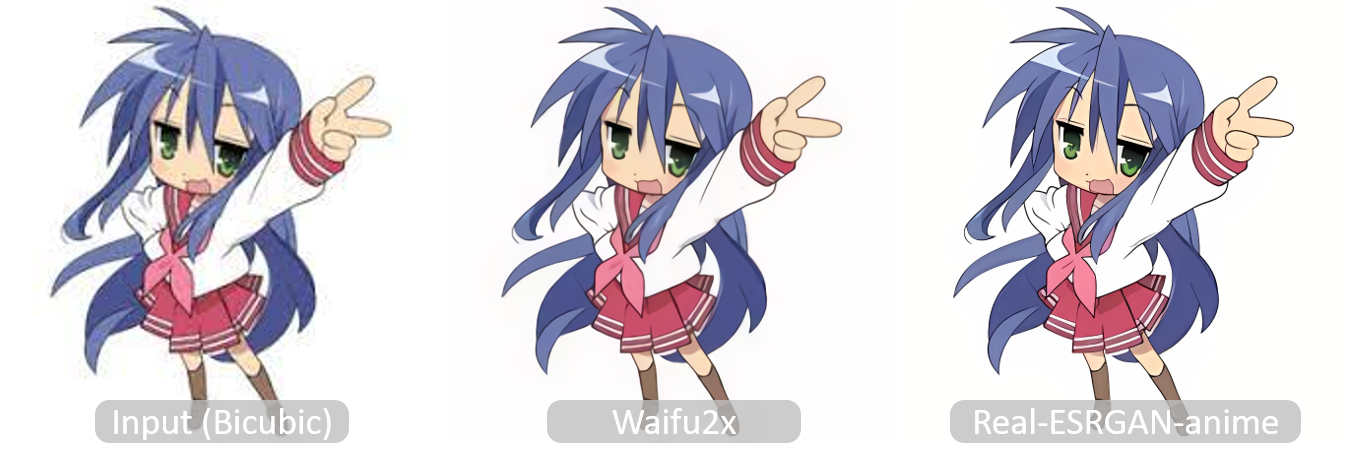
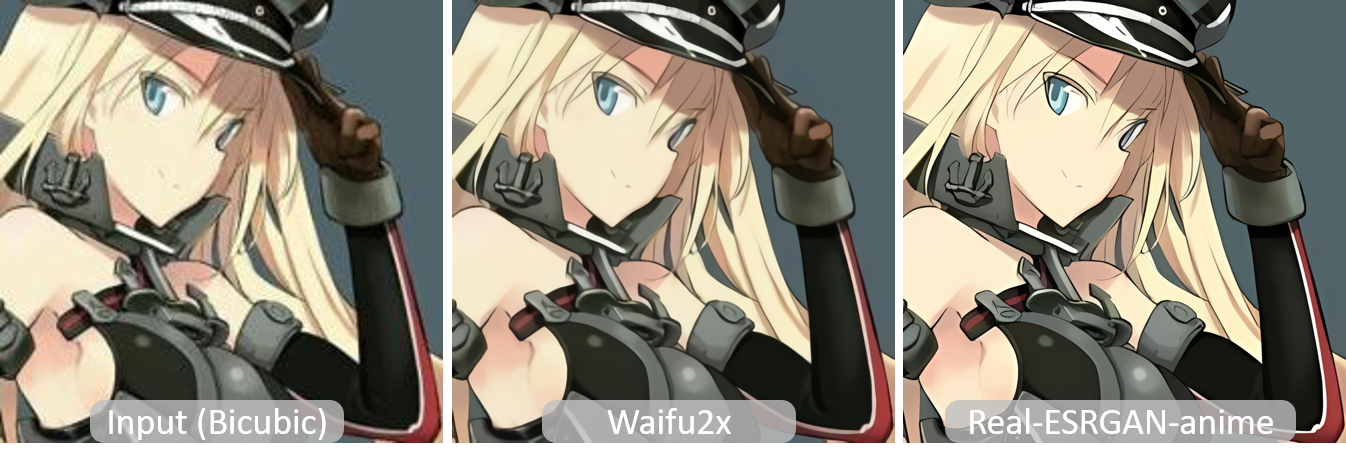
Real-ESRGAN anime model provides significant improvements over waifu2x, especially in detail preservation and artifact reduction.
Comparison with waifu2x using `-n 2 -s 4` settings
### Visual Comparison Examples


 ### Advantages Over waifu2x
Recovers fine details in hair, clothing textures, and background elements
Fewer compression artifacts and smoother gradients
Maintains crisp line art without introducing halos or blur
Better preservation of original anime color characteristics
## Best Practices
### For Anime Images
The anime model excels at preserving clean line art:
```bash theme={null}
python inference_realesrgan.py -n RealESRGAN_x4plus_anime_6B -i manga_pages
```
Works great for colored anime artwork:
```bash theme={null}
python inference_realesrgan.py -n RealESRGAN_x4plus_anime_6B -i anime_art
```
Ideal for upscaling anime screenshots:
```bash theme={null}
python inference_realesrgan.py -n RealESRGAN_x4plus_anime_6B -i screenshots
```
Use tiling for large manga pages or illustrations:
```bash theme={null}
python inference_realesrgan.py -n RealESRGAN_x4plus_anime_6B -i inputs -t 512
```
### Command Options
```bash theme={null}
# Basic usage
python inference_realesrgan.py -n RealESRGAN_x4plus_anime_6B -i inputs -o outputs
# With tiling (for large images)
python inference_realesrgan.py -n RealESRGAN_x4plus_anime_6B -i inputs -t 512
# Custom output scale (2x instead of 4x)
python inference_realesrgan.py -n RealESRGAN_x4plus_anime_6B -i inputs -s 2
# Save as PNG
python inference_realesrgan.py -n RealESRGAN_x4plus_anime_6B -i inputs --ext png
```
## Model Architecture Comparison
### Anime vs General Model
| Feature | RealESRGAN\_x4plus\_anime\_6B | RealESRGAN\_x4plus |
| ----------------- | ----------------------------- | ------------------ |
| **RRDB Blocks** | 6 | 23 |
| **Parameters** | Fewer | More |
| **Speed** | Faster | Slower |
| **Memory Usage** | Lower | Higher |
| **Training Data** | Anime-specific | General images |
| **Best For** | Anime, manga, illustrations | Natural photos |
The anime model's smaller architecture (6 blocks) makes it approximately **3-4x faster** than the general model while maintaining high quality for anime content.
## Discriminator Model
If you need to fine-tune the anime model on your own dataset:
| Property | Value |
| --------------------------- | ------------------------------------------------------------------------------------------------------------------------------------------------ |
| **Discriminator** | [RealESRGAN\_x4plus\_anime\_6B\_netD.pth](https://github.com/xinntao/Real-ESRGAN/releases/download/v0.2.2.4/RealESRGAN_x4plus_anime_6B_netD.pth) |
| **Corresponding Generator** | RealESRGAN\_x4plus\_anime\_6B |
This discriminator model is used during GAN training and is not needed for inference.
## Performance Tips
Process multiple images efficiently:
```bash theme={null}
python inference_realesrgan.py -n RealESRGAN_x4plus_anime_6B -i input_folder
```
Use tiling for large images:
```bash theme={null}
python inference_realesrgan.py -n RealESRGAN_x4plus_anime_6B -i inputs -t 400
```
Output at different scales:
```bash theme={null}
python inference_realesrgan.py -n RealESRGAN_x4plus_anime_6B -i inputs -s 2
```
Control output format:
```bash theme={null}
python inference_realesrgan.py -n RealESRGAN_x4plus_anime_6B -i inputs --ext png
```
## Next Steps
Learn about anime video upscaling
Explore models for natural images
### Advantages Over waifu2x
Recovers fine details in hair, clothing textures, and background elements
Fewer compression artifacts and smoother gradients
Maintains crisp line art without introducing halos or blur
Better preservation of original anime color characteristics
## Best Practices
### For Anime Images
The anime model excels at preserving clean line art:
```bash theme={null}
python inference_realesrgan.py -n RealESRGAN_x4plus_anime_6B -i manga_pages
```
Works great for colored anime artwork:
```bash theme={null}
python inference_realesrgan.py -n RealESRGAN_x4plus_anime_6B -i anime_art
```
Ideal for upscaling anime screenshots:
```bash theme={null}
python inference_realesrgan.py -n RealESRGAN_x4plus_anime_6B -i screenshots
```
Use tiling for large manga pages or illustrations:
```bash theme={null}
python inference_realesrgan.py -n RealESRGAN_x4plus_anime_6B -i inputs -t 512
```
### Command Options
```bash theme={null}
# Basic usage
python inference_realesrgan.py -n RealESRGAN_x4plus_anime_6B -i inputs -o outputs
# With tiling (for large images)
python inference_realesrgan.py -n RealESRGAN_x4plus_anime_6B -i inputs -t 512
# Custom output scale (2x instead of 4x)
python inference_realesrgan.py -n RealESRGAN_x4plus_anime_6B -i inputs -s 2
# Save as PNG
python inference_realesrgan.py -n RealESRGAN_x4plus_anime_6B -i inputs --ext png
```
## Model Architecture Comparison
### Anime vs General Model
| Feature | RealESRGAN\_x4plus\_anime\_6B | RealESRGAN\_x4plus |
| ----------------- | ----------------------------- | ------------------ |
| **RRDB Blocks** | 6 | 23 |
| **Parameters** | Fewer | More |
| **Speed** | Faster | Slower |
| **Memory Usage** | Lower | Higher |
| **Training Data** | Anime-specific | General images |
| **Best For** | Anime, manga, illustrations | Natural photos |
The anime model's smaller architecture (6 blocks) makes it approximately **3-4x faster** than the general model while maintaining high quality for anime content.
## Discriminator Model
If you need to fine-tune the anime model on your own dataset:
| Property | Value |
| --------------------------- | ------------------------------------------------------------------------------------------------------------------------------------------------ |
| **Discriminator** | [RealESRGAN\_x4plus\_anime\_6B\_netD.pth](https://github.com/xinntao/Real-ESRGAN/releases/download/v0.2.2.4/RealESRGAN_x4plus_anime_6B_netD.pth) |
| **Corresponding Generator** | RealESRGAN\_x4plus\_anime\_6B |
This discriminator model is used during GAN training and is not needed for inference.
## Performance Tips
Process multiple images efficiently:
```bash theme={null}
python inference_realesrgan.py -n RealESRGAN_x4plus_anime_6B -i input_folder
```
Use tiling for large images:
```bash theme={null}
python inference_realesrgan.py -n RealESRGAN_x4plus_anime_6B -i inputs -t 400
```
Output at different scales:
```bash theme={null}
python inference_realesrgan.py -n RealESRGAN_x4plus_anime_6B -i inputs -s 2
```
Control output format:
```bash theme={null}
python inference_realesrgan.py -n RealESRGAN_x4plus_anime_6B -i inputs --ext png
```
## Next Steps
Learn about anime video upscaling
Explore models for natural images