> ## Documentation Index
> Fetch the complete documentation index at: https://mintlify.com/xinntao/Real-ESRGAN/llms.txt
> Use this file to discover all available pages before exploring further.
# Introduction
> Real-ESRGAN - Practical Algorithms for General Image/Video Restoration
 # Real-ESRGAN
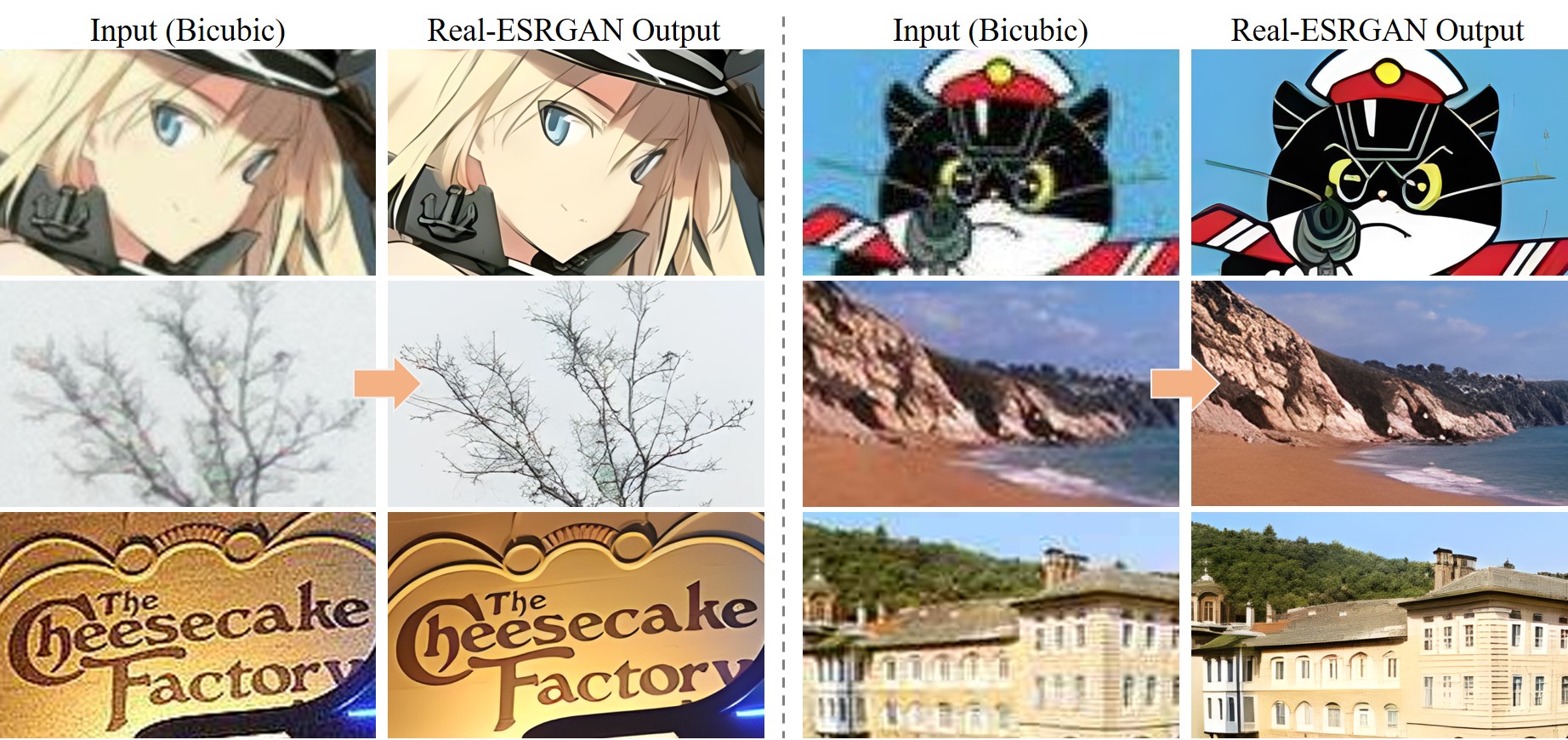
Real-ESRGAN aims at developing **Practical Algorithms for General Image/Video Restoration**. We extend the powerful ESRGAN to a practical restoration application, which is trained with pure synthetic data.
# Real-ESRGAN
Real-ESRGAN aims at developing **Practical Algorithms for General Image/Video Restoration**. We extend the powerful ESRGAN to a practical restoration application, which is trained with pure synthetic data.
 ## Key Features
Specialized models for general images, anime illustrations, and anime videos
Simple pip installation with Python >= 3.7 and PyTorch >= 1.7
Get started with upscaling in just a few lines of code
Integrated GFPGAN support for enhancing faces in images
## Available Models
Real-ESRGAN provides several pre-trained models optimized for different use cases:
The default model for general image super-resolution with 4x upscaling. Best for photographs and natural images.
Optimized for anime illustrations with a smaller model size (6 blocks). Provides excellent results for anime-style artwork.
Specialized model for anime videos with a compact architecture. Ideal for processing anime video frames.
A tiny model for general scenes with denoising support. Use the `-dn` option to balance noise and avoid over-smooth results.
2x upscaling model for cases where 4x is too aggressive.
Alternative 4x model with different training characteristics.
## Research Paper
Real-ESRGAN: Training Real-World Blind Super-Resolution with Pure Synthetic Data
**Authors:** Xintao Wang, Liangbin Xie, Chao Dong, Ying Shan
**Affiliation:** Tencent ARC Lab; Shenzhen Institutes of Advanced Technology, Chinese Academy of Sciences
**Publication:** International Conference on Computer Vision Workshops (ICCVW), 2021
[Read the Paper](https://arxiv.org/abs/2107.10833) | [Watch YouTube Video](https://www.youtube.com/watch?v=fxHWoDSSvSc) | [View Poster](https://xinntao.github.io/projects/RealESRGAN_src/RealESRGAN_poster.pdf)
## Try It Online
Before installing locally, you can try Real-ESRGAN online:
* [Replicate Demo](https://replicate.com/xinntao/realesrgan) - Web-based interface
* [Google Colab (General)](https://colab.research.google.com/drive/1k2Zod6kSHEvraybHl50Lys0LerhyTMCo?usp=sharing) - Interactive notebook for images
* [Google Colab (Anime Videos)](https://colab.research.google.com/drive/1yNl9ORUxxlL4N0keJa2SEPB61imPQd1B?usp=sharing) - Interactive notebook for anime videos
## Next Steps
Install Real-ESRGAN and its dependencies
Run your first image upscaling example
## Citation
If you use Real-ESRGAN in your research, please cite:
```bibtex theme={null}
@InProceedings{wang2021realesrgan,
author = {Xintao Wang and Liangbin Xie and Chao Dong and Ying Shan},
title = {Real-ESRGAN: Training Real-World Blind Super-Resolution with Pure Synthetic Data},
booktitle = {International Conference on Computer Vision Workshops (ICCVW)},
date = {2021}
}
```
## Key Features
Specialized models for general images, anime illustrations, and anime videos
Simple pip installation with Python >= 3.7 and PyTorch >= 1.7
Get started with upscaling in just a few lines of code
Integrated GFPGAN support for enhancing faces in images
## Available Models
Real-ESRGAN provides several pre-trained models optimized for different use cases:
The default model for general image super-resolution with 4x upscaling. Best for photographs and natural images.
Optimized for anime illustrations with a smaller model size (6 blocks). Provides excellent results for anime-style artwork.
Specialized model for anime videos with a compact architecture. Ideal for processing anime video frames.
A tiny model for general scenes with denoising support. Use the `-dn` option to balance noise and avoid over-smooth results.
2x upscaling model for cases where 4x is too aggressive.
Alternative 4x model with different training characteristics.
## Research Paper
Real-ESRGAN: Training Real-World Blind Super-Resolution with Pure Synthetic Data
**Authors:** Xintao Wang, Liangbin Xie, Chao Dong, Ying Shan
**Affiliation:** Tencent ARC Lab; Shenzhen Institutes of Advanced Technology, Chinese Academy of Sciences
**Publication:** International Conference on Computer Vision Workshops (ICCVW), 2021
[Read the Paper](https://arxiv.org/abs/2107.10833) | [Watch YouTube Video](https://www.youtube.com/watch?v=fxHWoDSSvSc) | [View Poster](https://xinntao.github.io/projects/RealESRGAN_src/RealESRGAN_poster.pdf)
## Try It Online
Before installing locally, you can try Real-ESRGAN online:
* [Replicate Demo](https://replicate.com/xinntao/realesrgan) - Web-based interface
* [Google Colab (General)](https://colab.research.google.com/drive/1k2Zod6kSHEvraybHl50Lys0LerhyTMCo?usp=sharing) - Interactive notebook for images
* [Google Colab (Anime Videos)](https://colab.research.google.com/drive/1yNl9ORUxxlL4N0keJa2SEPB61imPQd1B?usp=sharing) - Interactive notebook for anime videos
## Next Steps
Install Real-ESRGAN and its dependencies
Run your first image upscaling example
## Citation
If you use Real-ESRGAN in your research, please cite:
```bibtex theme={null}
@InProceedings{wang2021realesrgan,
author = {Xintao Wang and Liangbin Xie and Chao Dong and Ying Shan},
title = {Real-ESRGAN: Training Real-World Blind Super-Resolution with Pure Synthetic Data},
booktitle = {International Conference on Computer Vision Workshops (ICCVW)},
date = {2021}
}
```